
跟随鼠标的曲线
AI摘要
由 AI 生成 · 仅供参考
跟随鼠标的曲线,曲线和其它物体之间进行碰撞检测。 首先按Ctrl+J修改属性。 创建一个MC,如下图。是放大到800%的效果。 然后直接使用鼠标跟随,下面代码直接放到第一帧,创建轨迹。
跟随鼠标的曲线,曲线和其它物体之间进行碰撞检测。
首先按Ctrl+J修改属性。

创建一个MC,如下图。是放大到800%的效果。

然后直接使用鼠标跟随,下面代码直接放到第一帧,创建轨迹。
| tail_len = 2; tail_nodes = 100; nodes = new Array(); _root.attachMovie("the_head", "the_head", 1, {_x:250, _y:200}); _root.createEmptyMovieClip("the_tail", 2); for (x=1; x nodes[x] = {x:the_head._x, y:the_head._y}; } the_head.onEnterFrame = function() { this._x = _root._xmouse; this._y = _root._ymouse; the_tail.clear(); the_tail.lineStyle(2, 0x00ff00); the_tail.moveTo(the_head._x, the_head._y); nodes[0] = {x:the_head._x, y:the_head._y}; for (var x = 1; x rotation = Math.atan2(nodes[x].y-nodes[x-1].y, nodes[x].x-nodes[x-1].x); pos_x = nodes[x-1].x+tail_len*Math.cos(rotation); pos_y = nodes[x-1].y+tail_len*Math.sin(rotation); nodes[x] = {x:pos_x, y:pos_y}; the_tail.lineTo(pos_x, pos_y); } }; |
然后再建立一个MC设置如下,做一面墙来检测碰撞。
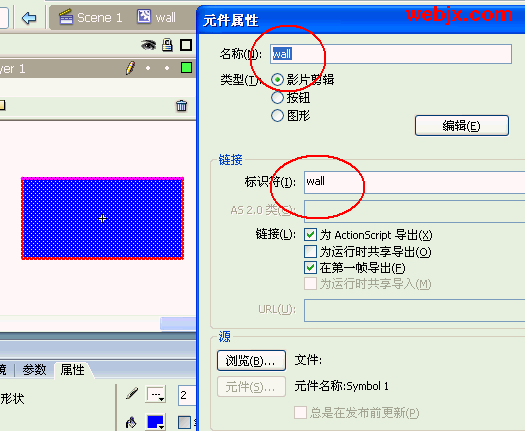
添加一个物体,来实验碰撞检测。添加如下Action到主场景第一帧。
| tail_len = 2; tail_nodes = 100; nodes = new Array(); _root.attachMovie("the_head", "the_head", 1, {_x:250, _y:200}); _root.createEmptyMovieClip("the_tail", 2); _root.attachMovie("wall", "wall", 3, {_x:250, _y:200}); for (x=1; x nodes[x] = {x:the_head._x, y:the_head._y}; } the_head.onEnterFrame = function() { this._x = _root._xmouse; this._y = _root._ymouse; |
版权声明:本文由驱动中国整理发布,转载需注明出处与原文链接。如有疑问请联系
editor@qudong.com。
来源:驱动中国 · 原文链接:https://www.qudong.com/article/12127.html
本文价值
★★★★★
—
成为第一个评分的人
登录后为本文打分
评论加载中…